#OERizona 2019 Provocation: Open Education Practices – Articulating Behaviors & Practices

This afternoon I had the honor of leading a “provocation” at the #OERizona Open Practices, Open People conference. It was a tremendous group of practitioners – both online and in-person. I knew we would have a large contingent of online participants, so I did my best to construct the activity (below) so that both groups could feel a sense of shared space.

In short, I lead participants in two 15 minute “sprints” where they brainstormed open educational behaviors and practices in shared google docs that represented their position(s). Then, as a surprise twist at the end, I led them to a doc with the text below which pulls everything together into a shared blog post that can be remixed, reused and recycled. (It was a bit of a spin on my #IPDX15 keynote.)

It’s always a wonderful experience when you have participants who are trusting and open in spirit – I sincerely appreciate the generosity of time and ideas shared – and I’m looking forward to seeing how the posts evolve and grow over time. I’m just starting to dig through the pages myself and can’t wait to see how the collective ideas continue to spread.

====

Are you new to Open Educational Practices?
Are you a shining star of Open Educational Practices? 

If you answered yes to either question, this post is for you! On Tuesday, 29 October 29, 2019 over 100 students, educators, librarians, instructional designers, educational technologists, and people in other roles supporting teaching and learning came together (face to face and online) at OERizona to create these pages for you. The pages will remain open until November 1st, and then will be cleaned up (formatted) and closed for further edits.  

In these pages, we attempt to provide examples of OEP behaviors and practices within each of our areas of expertise.   We were inspired by the work of Elhers and Conole (2010) and hope to continue to push the boundaries and definitions of Open Educational Practices. 

If you would like to replicate this activity, you can visit the slidedeck for more information. 

Attribution:
Session facilitated by Leigh Graves Wolf. Individual pages contain author attributions.

(Belated) #ISDDE2019 Recap

A few weeks ago I returned from the 2019 ISDDE conference. The conference was in Pittsburg this year, a short (in mid-western terms) drive east.  Thankfully, Tony was along for the ride with me! It was my first time to both Pittsburg and ISDDE and, I fell in love with both!

I was very honored to be inducted as a fellow this year along side many other amazing humans.

Picture of ISDDE 2019 Fellows


The conference is by no means a “sit and get” conference. We all came ready to discuss, to tackle challenges, and had the mindset to help others. At the beginning of the conference we self selected into strands – I was able to join the “Local Design Challenge” strand which was focused on work happening in the incredible new MuseumLab. Over the 3 days, we spent about 5 hours working through the challenge and presenting our ideas at the end of the conference.

Group of 6 people in elevator

ISDDE is a new community to me and I’m so thankful Tony and Cornelia introduced me to the network! It’s a uniquely specific group of educational designers, researchers, and innovators.  I’m looking forward to engaging much more with the ISDDE community in the future.

As I mentioned, I also fell in love with Pittsburgh. I felt like it was a secret being kept from me! I stayed in the Squirrel Hill/Shadyside neighborhood and had about a 2 mile walk to the conference and I walked by Mr. Rogers’ WQED studio every morning. Pitt’s campus was amazing – the Cathedral of Learning is incredible and like nothing I’ve ever seen in all of my worldly travels! I look forward to returning to Pittsburgh to explore more.

Artifacts from the conference can be found here: https://sites.google.com/view/isdde2019/program

And if you check out #ISDDE2019 you’ll see resources/ideas/links that were tweeted during the conference.

Open Pedagogy Reflection: Creating a Zero Textbook Cost course (with a little help from Library Reading Lists)…and I got a grant!

screenshot of leigh on youtube

At the end of last fall I had the opportunity to revise a course I teach TEL 713: Advanced Qualitative Methods.  I inherited an incredible course, and learned a lot through the eyes of the previous instructor – but, as with all online courses, a regular update and revision was warranted. One of my goals in the revision was to create a Zero Textbook Cost course. If you google “Zero Textbook Cost” you’ll see lots of initiatives (associated with Open Educational Resources/OER movements) to create not only courses, but, entire degree programs using open or free resources.  (I should also put in a little plug here that open education movements include things beyond texts, and include being open and transparent about educational practices (with things like this blog post!))

Using a combination of “true” OER and relying heavily on ASU Library online resources, the course is now a “textbook zero” course.  As I was redesigning, I received a serendipitous email from the libraries announcing a new tool called “Reading Lists” which integrated into our new LMS (Canvas.) I was very excited by this and jumped right into explore. It’s an incredibly easy to use too and is useful for the student (all course resources (the tool allows multimodal text) in one spot), faculty (analytics on use of resources, easy to copy from semester to semester) and the library (they get usage statistics and can make sure your course resources are accessible.) As an added open bonus, I can share my reading list across the entire ASU network, so, other instructors (and students) can see what we’re reading and learning.

The library recently created this LibGuide resource so you can learn more about the Reading List feature: https://libguides.asu.edu/readinglists. I was very happy to respond to a request to make a video to share how I’m using the list in my class, and how we’re using it in the EdD program to create a repository of all of our student dissertations.

While this feature is called “Reading Lists” at ASU, it’s also called Leganto at other universities, so, if you too are interested, you may want to check with your amazing university librarian to see if they have a similar technology to manage course reserves. Unfortunately, to see my lists as intended you have to be authenticated through ASU (certainly a limit to the open-ness of this) – but you can export to pdf, word, etc. – so you can click here to get a feel for the list in pdf form. That link takes you to an “APA formatted” export. In scare quotes, because you’ll see the APA is FAR from perfect (which is a plug for putting in better meta-data!)

I’m excited to dig into this more – and to share that I received a mini grant from the Office of Scholarship and Innovation in May to purchase MAXQDA to study this more in depth! The grant award announcement is below.

The final mini grant of the semester was awarded to Leigh Wolf. In May, Wolf received funding support for a qualitative analysis software that she will be using to research the use and effects of Open Educational Resources in the Educational Leadership and Innovation EdD program. For this research, she is collaborating with ASU Libraries and will be analyzing data from student interviews, course syllabi, and social media analytics. As a bonus, Wolf is also able to use the qualitative software for teaching advanced qualitative methods in the EdD program with free licenses provided to the students in her course.


A Critical Digital Pedagogy Musing: Going Beyond 11:59pm

One thing that has been on my mind lately (for a long time actually) is the concept of time in online classes. (Filing this under the umbrella of thoughts inspired by Critical Digital Pedagogy (Morris & Stommel), An Urgency of Teachers, #digped and #femedtech discussions.) We often sell online courses/programs as convenient, they can “fit in your schedule,” “anytime anywhere.” Those of us who have been online learners know…that’s simply not the case, it’s way more complicated.  

I’ve been teaching online (as fixed-term/clinical faculty) since 2006 (with the Master of Art in Educational Technology program at MSU and now with the EdD program in Leadership and Innovation at ASU.) Additionally, a good portion of my own MA coursework (at MSU) was online.  So, I’m creeping up on 20 years of being an online learner. With experience comes some comfort – and an understanding of what time means online, especially in a course management system (CMS). 

Most of the tools in CMSs that relate to time are surveillance oriented: how long did you spend in the course, how long did you spend on a specific page, when did you submit the assignment, how much of the video did you watch? As if seeing a statistic that a student “only” spent 15 minutes in the course means that they didn’t engage (when, in fact, they could have downloaded all of the materials and worked outside of the CMS.)

I don’t completely ignore the stats – if I see one of my students hasn’t logged in or engaged, that’s a cue to me to check in on them to see if they’re ok, if there is any way I can help.  When you teach online, you develop a sixth sense for the “vibe” of your class.  If I’m engaged, the students are also engaged.  I don’t have “late penalties” (even though the CMS forces a submission deadline) – if it’s submitted at 1am instead of 11:59pm it’s most likely because my student has been working all day, taking care of their family, and has budgeted midnight to 3 am to do coursework. This is scenario that I want to talk about – and provide some scaffolding around for my students. 

Graduate coursework takes time – time you’re giving to yourself.  Time to engage in ideas, time to read, time to write. When we’re bounded in 3 hour blocks, or all-day weekend classes in on-campus courses, it’s easy (for the most part) to block out distractions.  When we try to block that time at home or at work…not so easy.  

As online instructors (and you might even be able to argue any mode of learning), I think we need to be more up front about time – and our expectations for time.  Most universities have provided some scaffolding around this (which is usually hidden in academic procedures manuals, which, I like to read!) Generally, for a 3-credit graduate course, you are expected to dedicate about 9 hours of work. I honestly have no idea how universities came up with this metric, but the idea is that you spend 3 hours “in-class” and 6 hours of “homework.” So, I use that as a general rule. If students are new to online learning, how are they expected to know how much, or even how, to dedicate time in the online classroom space – which, isn’t always (especially in my class) in a CMS.

Here are two ways I make time open to students: 

Example 1: Module Overview 

This is an example of the text/format I use for TEL 713: Advanced Qualitative Methods. 

A Note on Time on Task
This course is 3 graduate credits. For 3 graduate credits, you should expect to dedicate 9 hours per week to the course. In designing the course, we have worked very hard to make sure that expectations fall within the 9 hours. At the end of every module overview, you will see a section called TIME ON TASK* with suggested time frames for each activity. These expectations are provided in the spirit of openness and transparency – and are simply that, guidelines. If you complete some tasks faster, that is ok. If you’re finding you are spending well over the time suggested, please contact the instructor.

These are general guidelines, however, especially as you start to work on concepts which directly apply to your dissertation, you may find yourself in what Csikszentmihalyi defines as flow. You certainly should not worry about going over the time allotted you find yourself in this state!

Module Assignments & Time On Task
Listen to instructor video & read overview – 30 minutes

    • Readings – 3 hours
    • Connect (this includes posting your VoiceThread and & listening) – 1 hour
    • Question (post to discussion forum) – 30 minutes
    • Play (set up notebook and write first entry) – 2 hours
    • Apply (set up document and start assignment) – 2 hours

Example 2: Spreadsheet

This is an example of the text/spreadsheet I use for TEL 703 Innovation in Teaching and Learning, TEL 711 Strategies for Inquiry, and TEL 707 Reading the Research. This is a cluster of courses that students take simultaneously over 15 weeks.  (I teach 2 of the 3 courses, but, we work as a team to deliver the experience.) 

This is a “time on task*” spreadsheet that many students found helpful last semester. Many students find the transition to three 3-credit courses a bit overwhelming.  This spreadsheet helps to give an idea of how to break your work up across the weekly modules.  Please do not see the suggested times as “set in stone” – everyone works at a different pace. But, if you do find yourself going well over the suggested times, please reach out to us as your instructors to help provide strategies for managing your workload (click image to enlarge): 
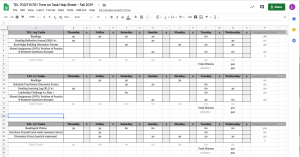
screenshot of spreadsheet with class tasks and time estimates

—

Now, I know it may seem silly to articulate time down to the minute, but, those are only provided as general guidelines..simply a place to start…an initial point of reference until you find your own pace. 

I’m also up front with the time I dedicate to feedback. It’s ideal that assignments/posts/blogs/artifacts are submitted when requested, because, I turn those back within 24-48 hours.  You email me, I email you back, generally in less than 12 hours – never more than 24. If something is marked urgent (which I tell my students to do if they need an ASAP answer) and if it’s within (my) waking hours, you get a response ASAP.  This is the hardest part of the “anytime anywhere” – it’s anytime anywhere for the learner…which to me is a twisted perspective that the instructor/guide is absent in an online environment. We mediate just as much as the content on the screen mediates.  In a class I can read your face, I can see the struggle…I can’t see that online.  BUT if I give you some guidelines, and open the door wide open to ask for help – at that moment you’re feeling the struggle…I hope I can catch you before you start spinning wheels and getting angry, sad, frustrated, defeated, second guessing…all things that happen way to easily in asynchronous spaces. 

Now, the paragraph above is tricky as well – I do have to be diligent myself with turning things off, something I’ve gotten much better at doing. (I used to get up at 3am to answer emails. I no longer do this.) Because I’m open with my time (and when my time is open), I have found that students respect and understand these boundaries and know when I’m “on” and if an urgent response is needed – they email me during those times. 

So…this is my first attempt at articulating this in the open. I would love to hear your strategies for dealing with time. Would also love to hear criticisms or critiques of my lines of thinking. 

*The naming of this as “time on task” was very intentional.  A standard question on instructor evaluation forms often reads “Instructors emphasize time on task”…what does that mean?! I’m not 100% sure (and neither are the students based upon their comments) but, we’re evaluated on it nonetheless. 

My @femedtech Curation Learning Journey

I’m just wrapping up my first “Twitter takeover” (or curation) and I thought I would take a minute to reflect on the experience.  For the past two weeks I’ve been in charge of the @femedtech Twitter feed. I have been following FemEdTech for quite a while and appreciate the network, and no networks do not grow if they are a house of cards…so…I decided to volunteer.

After participating in #PressEdConf19 and into curating @femedtech, I quickly realized how out of practice I was!  For years I managed several Twitter feeds in my role(s) with the MAET program. I had a great workflow down which included TweetDeck and IFTTT and felt I did a pretty good job maintaining and feeding the network. After leaving that role, I completely disconnected all of the “pipes” I had built and sort of went into consumer (and occasional producer or re-tweeter) mode on Twitter.   Curating @femedtech forced me to be much more attentive and strategic. I fired up TweetDeck for the first time in quite a while and found myself much more aware of followers, who I was retweeting and what I was tweeting. This really aligned well with the #femedtechvalues activity which is currently running. When signing up to curate, I knew that I wasn’t going to haphazardly post things – but – the FemEdTech values were always on my mind, and, in visiting (and revisiting) them daily, I began to think of ways the values/network could be improved.

One thing that struck me as an area of opportunity for growth was the @femedtech Twitter avatar.  I took up the values challenge and posted this tweet:

Some really fruitful and thoughtful discussion ensued, and, I felt empowered to change the avatar.  It was really interesting to me how I negotiated this decision. I posted as myself, retweeted from @femedtech – and then, with encouragement from members of the network, made the change.

I found myself questioning myself a lot more than I thought I would over the past two weeks – am I posting enough, too much? I tried to tamper down those voices in my head as much as possible.  The network has established very open and caring practices and expectations (thank you Helen & Frances – and of course all of the others who have contributed over time). I learned a lot from the experience and wish Martina the best of luck as she takes over starting on Monday!

There are many ways to get involved in the FemEdTech open space. You can learn more by visiting: http://femedtech.net/about-femedtech/get-involved/

#PressEdConf19 – A quick recap

I just finished presenting with Scott at the 2019 PressED conference! PressED is a conference “looking into how WordPress is used in teaching, pedagogy and research. The conference happens solely on twitter.” Here is the document we used to construct our “talk” – it was SUCH an exciting experience, from constructing our narrative to the actual copy/pasting/posting of our tweets. Below you’ll find a “moment” with our presentation – and be sure to follow the #PressEdConf19 stream today – incredible work and conversations being shared!!

Returning from #OER19: Quilting together a short story on the power of being open

I’m on the plane ride home from an amazing experience at #OER19. In thinking of what I could write to recap – I thought I would share a story I’ve been sitting on for a few weeks. Inspired by Kate Bowles’ use of the powerful metaphor of a quilt in her incredible keynote and, the discussions I had with several colleagues around open teaching practices – I’ll begin laying out the patchwork.

On July 11, 2016, I was in class with Debbie. I think it was the end of the third week of our intensive 4 week Master’s in Educational Technology program. Over the week the students had to create an “i-Infographic” for an audience. In our program we always encouraged and supported our students to publish and share their important work with the world.

I clearly remember Debbie coming up to me and having me read her (awesome) blog post – she was filled with a sense of worry and trepidation about putting her work out there in the open. I reassured her – and ultimately she courageously hit “publish.” And that’s where the story of the Twitter 4 Teachers infographic begins.

Debbie’s infographic has been continually “going viral” since 2016. If you do a quick google image search for “Twitter 4 Teachers” (the title of the infographic) you’ll see hits from around the world – teachers/educators/administrators who have used her (Creatively Commons licensed) graphic . Over the years she would share tweets with me or messages from other educators who had found her infographic and shared out they were using it in their context.

Things hit a new level a few weeks ago. My twitter notifications were uncharacteristically blinking (which made me worry at first.) And then, I realized I was looped into this amazing exchange:

It turns out Marc (in Germany) had found Debbie’s infographic, and remixed it into German.

Not only that – but he went on to share:

So now, Debbie, Marc, and educators across Germany are all connected – because Debbie took a risk to be open, because our pedagogy & curriculum supported and encouraged open, and because Marc is an open practitioner and embodies the ethos of remix/reuse/share. Since all the layers of this experience were open, the story above is rich with hyperlinks of evidence – digital trails, timestamps and artifacts that can be stitched together – into this new quilt.

Design Thinking & Blended Learning Design Discussion – Thank you @edtechne !

It was an absolute honor to return to the School of Education at NUIG this past Monday to share thoughts on Design Thinking & Blended Learning Design for their Research Seminar Series. I’m truly lucky to have such wonderful connections and colleagues at NUIG – I appreciate my “old” friends who came to the table, and the new ones I met this time around! A special thanks to Tony, Cornelia & Gerry for this opportunity.

I’m sharing my slidedeck below – it was just a brief conversation starter, and, then we had the luxury of having a good chat and poked some holes at design thinking and blended learning efforts. Thanks to all of you who pushed my thinking – and I’m looking forward to continued conversations and collaborations.

#OER19 – Session Recap & Invitation to Collaborate

It was so much fun presenting at OER19yesterday.  I’m so lucky to be here connecting with friends I have known for years – and to meet new friends who are also exploring all definitions and meanings of open. Thank you all who were able to come in person (as there were so many amazing sessions to choose from).

My session description & slides are below, and I ended with a timely invitation that I would like to share here as well. In October 2019, #OpenEd19 will take place in Phoenix and I’m looking to collaborate with anyone who would also like to examine (y)our course syllabi and reading lists for open and see where our exploration takes us (and then, we will share that at #OpenEd19.) If accepted and you’re unable to come to Phoenix, we can coordinate virtual participation so your voice will be there will us in the presentation.

Please tweet or message me if you’re interested and I’ll be in touch soon to share a Google doc with the proposal so we can finalize and submit by April 19th!

#OpenEd19 – an invitation to collaborate

  • Deeply examine our syllabi & reading lists
  • Look for “statements of open” in syllabus
  • Are our open resources visible? How? 
  • What opportunities exist to make open more transparent in our classes? 
  • What practices can we cultivate? 
  • What resources can we share? 

Session Description

In this reflective practice session I would like to share heuristics I have used for “open coding” my syllabus which help the learners in our care see the critical processes behind resource inclusion in a syllabus. Inspired by the method of open coding (Glasser, 2016), this takes the “open” in open coding a step further and makes the actual codes visible to our learners. As practitioners, we may profess to being digitally literate, critical, or open however, many of the very literacies we practice are often hidden in the construction of a syllabus as our students and co-learners only see the final product. By openly coding resources on a syllabus we are pulling back the layers for the students and modeling our understanding(s) of open. In addition to making our curricular moves visible to students, it also forces us to take a close and critical look at our syllabi in an ever evolving quest to improve our own open practices.

While the genre of the syllabus often gets criticized for housing mundane (or even damaging) policies, it offers tremendous opportunity and potential (Konikel, 2018). I will engage the participants by sharing my emerging protocol and technologies and inviting others to participate in the syllabi coding process after OER19 with the hopes of producing a collectively authored publication on the results of our syllabi self-studies. Additionally, I will share open syllabi resources such as the Humanities Commons CORE Repository (https://hcommons.org/core/) which provide further collaborative and open opportunities.

References

Glaser, B. (2016) Open coding descriptions. Grounded Theory Review: An International Journal. December 2016, Vol.15(2). [Online] Available at: http://groundedtheoryreview.com/2016/12/19/open-coding-descriptions/ [Accessed: 26 November 2018]

Konikel, S. (2018) Examining the syllabus as scholarly object: what can we learn about values from this teaching tool? [Online]. Available at:
https://humetricshss.org/blog/examining-the-syllabus-as-scholarly-object-what-can-we-learn-about-values-from-this-teaching-tool/ [Accessed: 26 November 2018]

AcceleratED (#apdx19) and IntegratED (#ipdx19) Recap & Reflection

It was a tremendous honor to be asked back to AcceleratED (#apdx19) and IntegratED (#ipdx19) in Portland. I had a wonderful time reconnecting with old friends and of course, the opportunity to meet new friends.  As always, Darren did an amazing job pulling together many different inspiring and thought provoking facilitators. What I love about the conference is the expectation for all to come and be active participants. I sincerely want to thank everyone who came to my sessions – they were challenging conversations and we pushed ourselves to think beyond “fun and free.” The conference ended with a raw and challenging talk by Douglas Rushkoff (many of the ideas were from his new book Team Human,which I have added to my reading list.)

Below you will find a recap of my sessions (with the associated slides/handouts.) All of the collaborative notes from the both conferences can be found: APDX Notes, IPDX Notes. You can also cull through the conference TAGS twitter archives by visiting #apdx19 and #ipdx19.

Design Thinking: How to Follow Through (APDX)

Design thinking (DT) has infiltrated many of our PD/PL sessions, but, often we’re left cleaning up post-it notes with no real plan for action. This session takes a critical look at DT and provides an opportunity to practice sustainable DT.

There were some fantastic notes and suggestions brainstormed during the session which you can find here.

What now? A Critical (Speed Discussion) #EdTech (APDX)

At times it feels as if the conversations and sessions are repeating themselves – are we truly making progress? This session will be a rapid series of critical provocations between participants culminating in idea generation and challenges.

Here are the discussion questions along with critical questions brainstormed during the session.

Data Detox: An Ethical Intervention (IPDX)

Using Mozilla & Tactical Tech’s Data Detox as an intervention, this session will be an interactive detox and an entry point into discussions about ethics and digital literacy.

Write Aloud worksheet used during the session: https://docs.google.com/document/d/12kyxqVpqzjxHqG0v53-KLXzUE3gmC9Ff4TnNBRtc8Ag/copy

Theory into Practice: Listening, Learning & Sharing (IPDX)

This workshop is an intense refresher (or introduction) into educational technology theories (new and old.) Participants will create an #iPDX19Syllabus of resources to share with the conference community.